
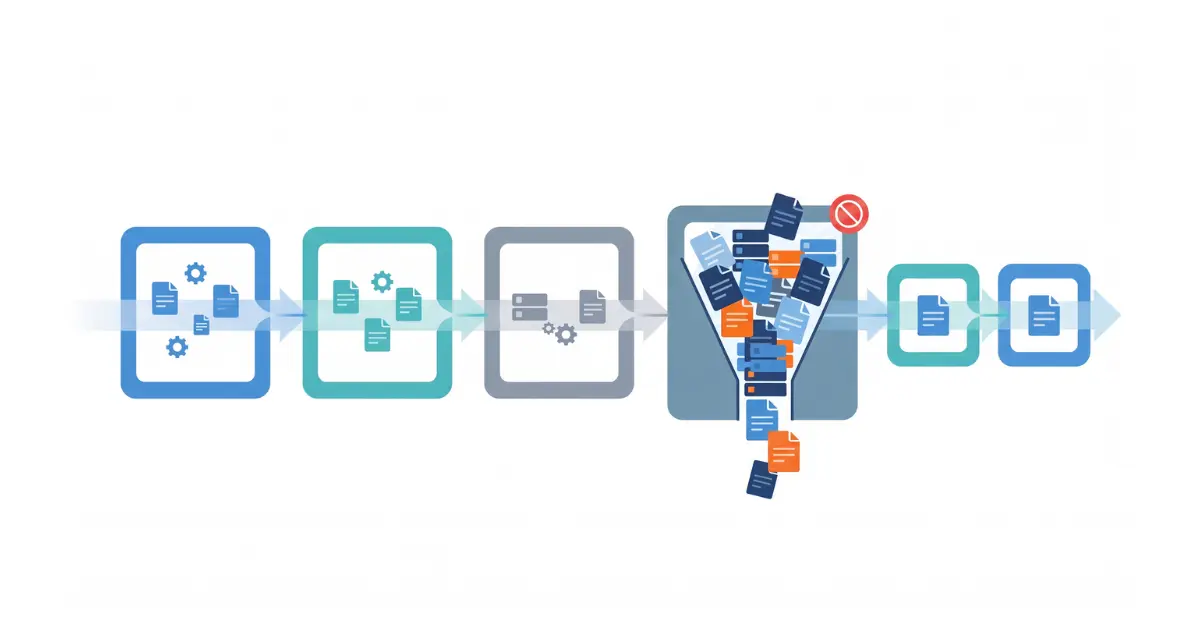
Workflow bottlenecks rarely begin as obvious failures. They often appear as a delayed approval, a spreadsheet that needs to be updated manually, a queue that keeps growing, or one employee who has to answer the same questions before work can move forward.
Over time, these small points of friction can increase processing time, create rework, delay customers, and make teams dependent on manual coordination. The longer they remain hidden, the more likely the business is to treat the symptoms—adding people, sending reminders, or creating another spreadsheet—instead of fixing the underlying constraint.
The best time to address workflow bottlenecks is before they become expensive. That starts with understanding how work actually moves through the business, where it waits, and why.
A workflow bottleneck is a step, resource, decision, or dependency that limits how efficiently work can move through a process. It may be a slow approval, an overloaded employee, missing information, a system that does not integrate with another system, or a rule that creates unnecessary waiting.
The important point is that the slowest-looking activity is not always the real bottleneck. A task may take only a few minutes to complete but sit in a queue for two days. Another step may require repeated corrections because the information entering it is incomplete. Finding the bottleneck means looking at the complete flow, not only individual task duration.
IBM describes process mining as a data-driven way to discover, validate, and improve workflows using event data from business systems. That distinction is useful: the process people believe they follow and the process that actually happens are not always the same.
You do not need advanced analytics to begin looking for bottlenecks. Many processes already produce visible warning signs.
Repeated missed deadlines, growing backlogs, frequent status requests, excessive overtime, duplicate data entry, approval queues, manual copying between systems, and recurring customer complaints can all indicate that part of the workflow is restricting the rest.
Another warning sign is dependence on a particular person. If work stops whenever one employee is unavailable because only that person knows how to approve, correct, or move a case forward, the process has a capacity and knowledge constraint even if the task itself appears simple.
These symptoms tell you where to investigate. They should not automatically be treated as the root cause.
A useful workflow analysis starts by mapping the process from trigger to outcome. Identify who starts the work, which information is required, which systems are used, where decisions occur, who receives the output, and what happens when something goes wrong.
The map should reflect real behavior. Ask the people doing the work where they leave the official process, which steps they repeat, what they wait for, and which information they regularly have to chase.
This often reveals hidden work that is missing from formal procedures: downloading a report, cleaning a spreadsheet, re-entering data, asking for clarification by email, checking another system, or manually notifying the next department.
Those extra steps matter because bottlenecks frequently live between systems and teams rather than inside the main application.
One of the most useful distinctions is the difference between the time spent actively working on something and the time it spends waiting.
An approval might require five minutes of attention but remain untouched for a day. Preparing a quotation might take 30 minutes once all information is available, but the team may spend hours waiting for technical details. An invoice might be generated quickly but require manual verification before it can be sent.
If you measure only task duration, these delays can remain invisible. Track both active processing time and total elapsed time wherever possible. A large gap between the two is a strong signal that queues, handoffs, missing information, or priority rules need attention.
Every handoff introduces the possibility of waiting, missing context, or duplicated work. This is especially true when the next person or department cannot begin until information arrives through email, a spreadsheet, a shared folder, or a manual notification.
Review what each handoff requires. Is the information complete? Does the recipient know that work is ready? Does someone need to reformat or re-enter data? Is ownership clear when an exception occurs?
A process with many handoffs is not automatically inefficient, but each transition should have a clear purpose. If work repeatedly moves between people simply to obtain information or approval that could have been captured earlier, the workflow may be creating its own bottleneck.
Some bottlenecks do not create a visible queue. Instead, they create loops. Work moves forward, gets rejected or corrected, and returns to an earlier step.
Rework can come from incomplete input, unclear rules, inconsistent data, quality problems, or approvals that happen too late in the process. Because people remain busy, the workflow can appear productive even while the same case is being handled several times.
A Microsoft case study using process mining to analyze a demand-generation workflow found that 20% of cases required rework and identified a review loop as a major bottleneck. The example shows why repeated paths and loops deserve the same attention as obvious waiting time.
Track how often work returns to a previous step and why. Reducing one recurring correction can sometimes improve the process more than speeding up several individual tasks.
When a queue grows, adding more people can seem like the obvious solution. Sometimes it is. But a capacity problem should be confirmed before resources are added.
Ask whether the workload consistently exceeds available capacity, or whether work arrives unevenly because of batching, poor prioritization, missing information, or upstream delays. Also check whether the resource is spending time on tasks that could be removed, standardized, or handled elsewhere.
If a specialist spends a large part of the day copying data or answering routine status questions, the problem may not be a shortage of specialist capacity. The workflow may simply be consuming that capacity inefficiently.
Interviews and process mapping are excellent for discovering where to look, but system data can help confirm whether a suspected bottleneck is frequent enough to matter.
Useful measures include total cycle time, waiting time by step, queue length, number of handoffs, rework frequency, exception rate, overdue cases, and the variation between similar cases. Comparing these measures by department, product, customer type, or process variant can reveal patterns that averages hide.
According to Microsoft’s process mining guidance, process mining can help organizations understand how real processes operate, discover inefficiencies, and identify opportunities to standardize and improve them. This can be particularly useful when a process crosses several systems and produces enough event data for manual observation to become difficult.
You do not need process mining for every workflow. For smaller processes, a well-structured spreadsheet or dashboard may be enough. The objective is to gather evidence that helps distinguish recurring constraints from isolated incidents.
Once a bottleneck is visible, resist the temptation to automate it immediately. A slow step may exist because the input is incomplete, the approval rule is unnecessary, the system lacks required data, or responsibilities are unclear.
Ask why the delay occurs and continue until the answer points to something the organization can change. If quotations wait for technical information, why is that information missing? If approvals accumulate, why does every case require the same approval? If employees re-enter data, why cannot the systems exchange it?
This prevents the business from automating a poorly designed process. Faster execution of an unnecessary step is still unnecessary work.
Automation is most useful when the process is understood and the repetitive work is predictable enough to handle consistently.
Good candidates can include transferring structured data between systems, routing requests, generating routine documents, sending status notifications, checking defined conditions, or escalating cases when thresholds are exceeded.
Human judgment may still be appropriate for exceptions, negotiations, technical decisions, or approvals with meaningful business risk. The goal is not to remove people from every step. It is to keep their attention on work that genuinely requires judgment.
Once the workflow has been mapped and the root cause is clear, repetitive steps become much easier to evaluate for automation. This is where Accleverate Flow AI can fit naturally: the service starts from workflow analysis, then applies automation or AI only where it can remove unnecessary manual work or improve the flow. The sequence matters because automating a poorly understood process can simply make the wrong process move faster.
Some workflow problems cannot be solved by changing one task because the constraint sits between systems. Sales may enter information that production cannot access directly. Warehouse updates may not reach customer service. Documents may need to be recreated because one platform cannot use data from another.
In these situations, the real issue is information flow. Improving the process may require integration, a shared operational layer, or redesigning how data moves between departments.
If the bottleneck is not one task but the way several departments exchange information, the solution may need to address the wider operating structure. In that situation, Accleverate Pulse is one example of a modular platform designed to connect sales, production, warehouse, logistics, and operational workflows in a shared environment, reducing the handoffs created by disconnected systems.
Where the requirements are highly specific or existing systems need to remain in place, the better answer may be targeted integration rather than replacement.
Standard applications work well when the business process can reasonably adapt to the software. They become less effective when a company depends on specialized rules, calculations, data structures, or integrations that generic tools cannot support without extensive workarounds.
If bottleneck analysis repeatedly points to the same software limitation, it may be worth evaluating whether the system should be extended, integrated, modernized, or replaced.
When the recurring constraint comes from software that cannot support a company-specific process, adding another workaround usually does not solve the underlying problem. A more tailored approach may be appropriate, and Cleverativity’s Custom Software Solutions can support integrations, extensions, or applications built around the workflow the business actually needs.
A process map may reveal several inefficiencies at once. Trying to fix all of them together can make improvement projects difficult to manage.
Prioritize the constraints that have the greatest effect on customers, revenue, cost, risk, or employee time. A bottleneck affecting hundreds of routine transactions may deserve attention before an inconvenient step that happens twice a month. A low-volume delay may still take priority if it affects regulatory compliance or a critical customer commitment.
It is also useful to consider ease of improvement. A simple rule change or integration may remove significant friction quickly, while a larger system redesign may need to be planned as a separate initiative.
Removing one bottleneck changes the flow, and another constraint may become more visible afterward. Process improvement is therefore not a one-time exercise.
Define a small set of measures before making the change so you can compare performance afterward. Depending on the workflow, that might include cycle time, waiting time, backlog, rework, manual touches, error rate, or percentage of cases completed within a target time.
If performance improves, continue monitoring long enough to make sure the change is sustainable. If it does not, revisit the root cause rather than assuming the solution simply needs more time.
A workflow bottleneck is a step, resource, decision, or dependency that limits how efficiently work can move through a process. It can appear as waiting, growing queues, rework, overloaded employees, missing information, or disconnected systems.
Start by mapping the real process, then look for waiting time, queues, repeated handoffs, rework, manual data entry, missed deadlines, and dependency on specific people. Use operational data to confirm which constraints occur frequently and have meaningful business impact.
Common causes include limited capacity, incomplete information, unnecessary approvals, unclear ownership, poor prioritization, disconnected software, manual data transfer, inconsistent rules, and repeated corrections.
Automation can remove some bottlenecks when the underlying process is understood and the work is repetitive and rules-based. It should not be used to automate unnecessary steps or hide a poorly designed process.
A delay is an instance of work taking longer than expected. A bottleneck is a recurring constraint that limits the flow of the wider process. A single delay may be unusual; a bottleneck repeatedly affects throughput or cycle time.
No. Interviews, process mapping, timestamps, spreadsheets, and operational reports can be enough for simpler workflows. Process mining becomes more useful when processes are complex, cross multiple systems, or generate enough event data that the real process is difficult to reconstruct manually.
Workflow bottlenecks become expensive when they remain invisible long enough to be accepted as normal. Repeated reminders, spreadsheets, status meetings, rework, and manual handoffs may keep the process moving, but they can also hide where time and capacity are being lost.
Start by mapping the real workflow, measuring where work waits or repeats, and identifying the root cause before choosing a solution. Sometimes the answer is a process change. Sometimes it is better integration. In other cases, automation can remove repetitive work and make exceptions easier to manage.
If repeated delays, manual handoffs, or disconnected tools are making a process harder to manage, Accleverate Flow AI can help you examine the workflow first and identify where process changes, automation, or AI could create practical value. Not sure what is causing the bottleneck? Contact Cleverativity to discuss the current process and determine the most useful next step before investing in a solution.
